DH API
Folder Structure
- The RuncontrolServices folder structure is organized into three subfolders for services: OrchestratorServices, ExecutorServices, and UploadFiles.
- Each service folder initially contains three files: an executable file, a script, and a VBS file (only for Windows for running the service in the background).
Initial Setup
OrchestratorServices:
In orchestrator script, update the following as per the requirement: DB name(MSSQL or ORACLE), DB connection string, schema name and host url(ip:port).
The connection string will be of format:
MSSQL
Driver={ODBC Driver 17 for SQL Server};Server=servername;Database=dbname;UID=userid;PWD=password;

ORACLE
userid|password|servername:port/sid
ExecutorServices:
- In Executor script, update the following as per the requirement: executor url and orchestrator url.
UploadFiles:
- In Upload- Files script, update the following as per the requirement: DB name(MSSQL or ORACLE), DB connection string and schema name.
Starting the service
Linux:
- To start a specific service in Linux, simply run the corresponding script.
Windows:
- In Windows, starting the service in the background can be achieved by executing the specific VBS file, which internally calls the script.
Testing the service
- To ensure the functionality of the Orchestrator service, the following methods can be employed:
- Using Curl Command:
curl -X POST --url http://127.0.0.0:6443/batch_full_status/1 -H 'Content-Type: application/json' -d '{ "as_on_date": "2023-03-31", "batch_id": 1, "token" :"eyJ0eXAiOiJKV1QiLCJhbGciOiJIUzI1NiJ9.eyJzdWIiOiJGRjAxNjM5NEJDM0M0MEJCOUJGRjJGRTRCQzIwQkFCNyIsImlhdCI6MTY4NTY4NTI1OSwiZXhwIjoyMTQ3NDgzNjQ4fQ.QXmLhaR8IRPuZAfm9XB7Sv5G2TpSOX8-rS3YbiOdEKQ"}'
Note: Adjust the IP and port (same as provided for the Orchestrator service), as_on_date, and batch_id according to the requirements.
- Using a Web Browser: If the curl utility is unavailable, the service can be tested by accessing the URL:
http://127.0.0.0:6443/batches/1
Note: Adjust the IP and port (same as provided for the Orchestrator service), and batch_id (/batches/batch_id) according to the requirements.
RuncontrolService Configuration
OrchestratorServices
This contains the configuration changes needs to be done for different service types.
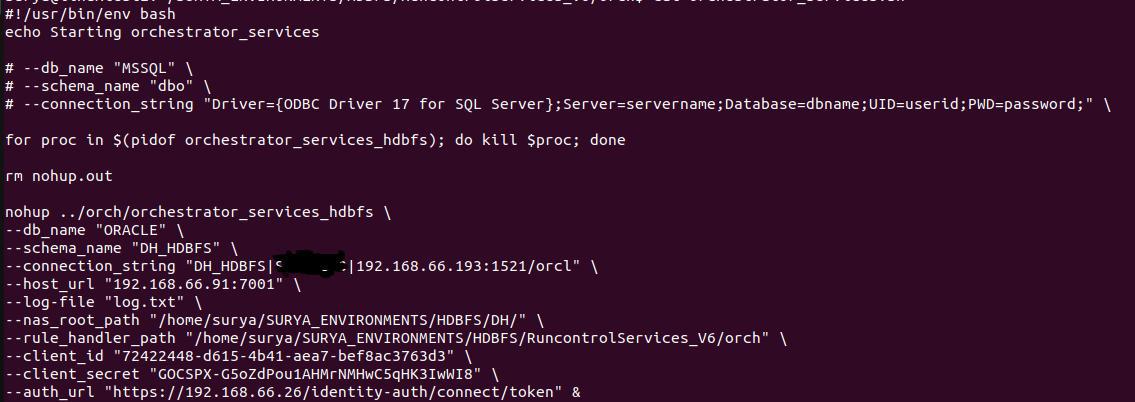
1. ECL
For ECL, rule configuration part needs to be updated.
Additional Mandatory Parameters:
# Parameters Description Example 1 client_id The unique client identifier used to authenticate with the identity server. 72422448-d615-4b41-aea7-bef8ac3763d3 2 client_secret The secret key paired with the client ID for secure authentication. 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 3 auth_url The identity server endpoint URL used to obtain access tokens.
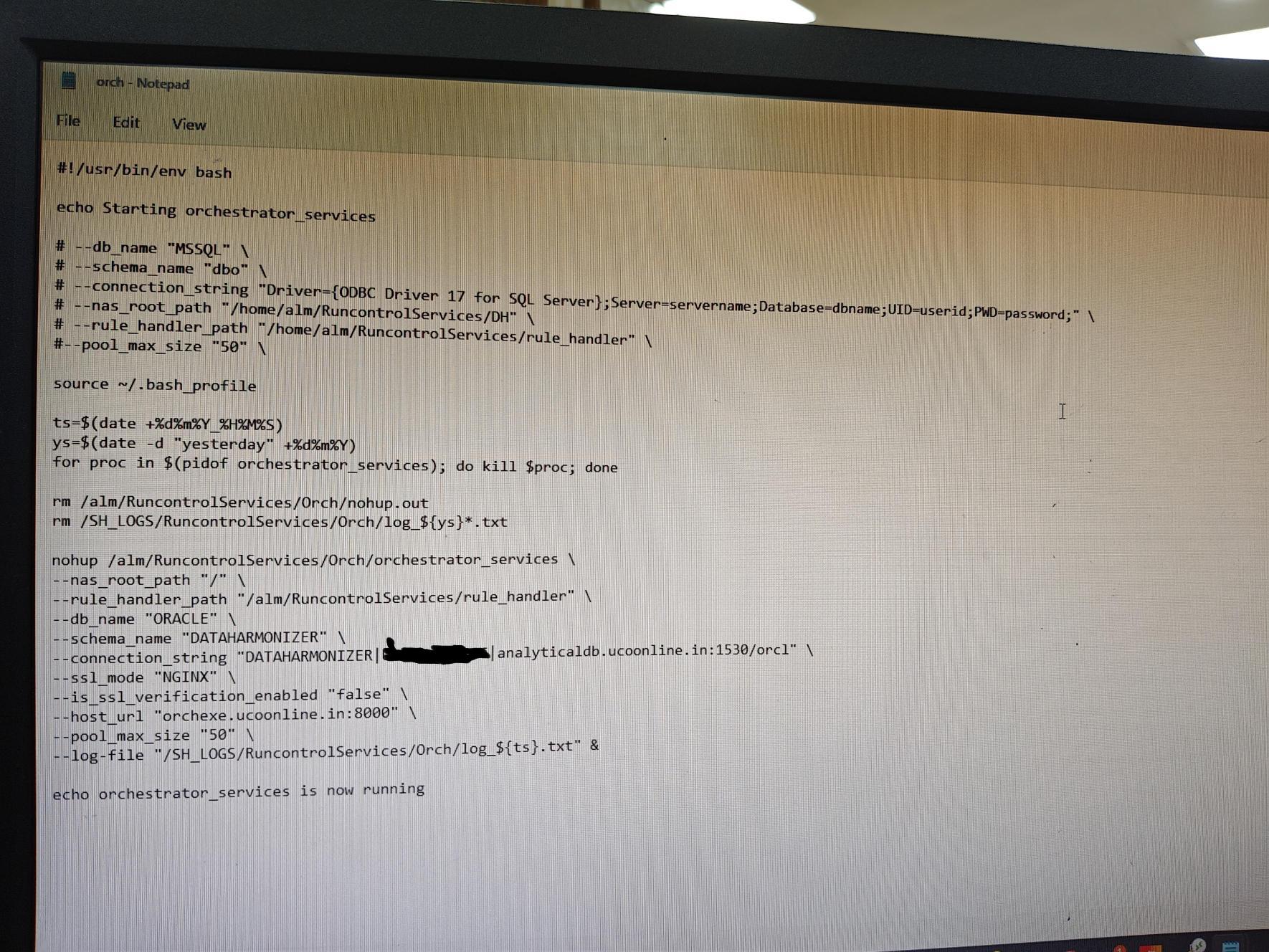
2. NGINX
For NGINX, the following additional parameters need to be updated in the script.
Additional Mandatory Parameters:
# Parameters Description Example 1 ssl_mode Tells the service that Nginx is handling the SSL/HTTPS layer. NGINX 2 is_ssl_verification_enabled Disables SSL certificate verification within the service. true/false 3 host_url The public-facing URL or address through which the Orchestrator service is accessible via Nginx.
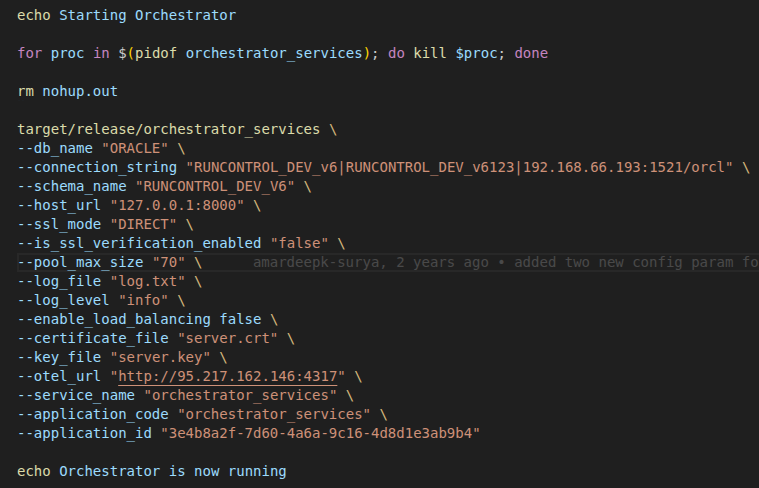
3. Otel Integration
For otel integration, the following additional parameters need to be updated in the script.
Additional Mandatory Parameters:
# Parameters Description Example 1 otel_url Specifies the OpenTelemetry Collector endpoint URL used for exporting telemetry data such as logs, metrics, and traces http://192.168.66.91 2 service_name Defines the service name under which telemetry data will be reported in the OpenTelemetry platform orchestrator_services 3 application_code Identifies the application code associated with the telemetry data for tracking and classification purposes orchestrator_services 4 application_id Specifies the unique application identifier used to distinguish the application in the telemetry system 3e4b8a2f-7d60-4b6a-9c16-4d8d1e3ab9c4
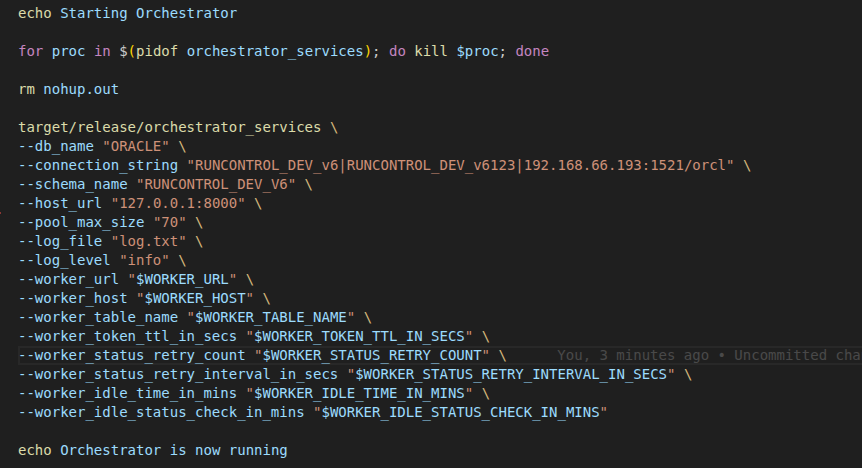
4. AWS
For running the orchestrator services on AWS, the following additional parameters need to be updated in the script.
Additional Mandatory Parameters:
# Parameters Description Example 1 worker_url Specifies the Worker API endpoint URL used for communicating with the worker service https://vpce-0d922f47aa94.execute.amazonaws.com/SIT 2 worker_host Defines the host header value required for routing requests to the worker service cd70l1mbra.execute-abc.amazonaws.com 3 worker_table_name Specifies the database table name used for storing or managing worker-related information. table_name 4 worker_token_ttl_in_secs Defines the validity duration of the worker authentication token in seconds 300 5 worker_status_retry_count Specifies the maximum number of retry attempts for worker status checks 5 6 worker_status_retry_interval_in_secs Defines the time interval in seconds between consecutive worker status retry attempts 5 7 worker_idle_time_in_mins Specifies the maximum idle duration in minutes after which the worker is considered inactive 5 8 worker_idle_status_check_in_mins Defines the interval in minutes for performing idle status checks on the worker 5
ExecutorServices
This contains the configuration changes needs to be done for different service types.
1. NGINX
For NGINX, the following additional parameters need to be updated in the script.
Additional Mandatory Parameters:
# Parameters Description Example 1 ssl_mode Tells the service that Nginx is handling the SSL/HTTPS layer. NGINX 2 is_ssl_verification_enabled Disables SSL certificate verification within the service. true/false 3 orch_url The public-facing URL or address through which the Orchestrator service is accessible via Nginx. 4 exec_url The public-facing URL or address through which the Executor service is accessible via Nginx.
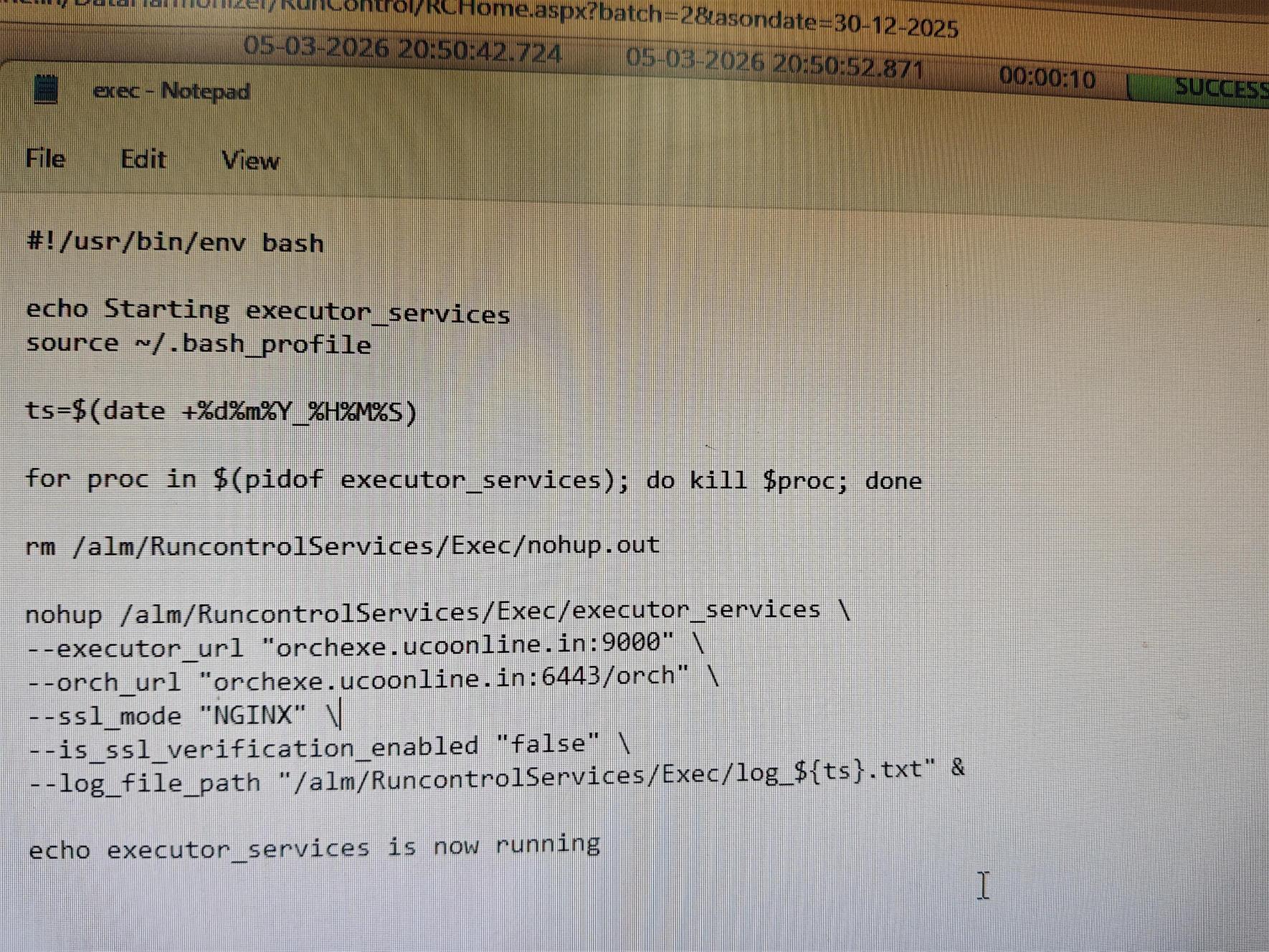
- Along with script change, the ip present in ExecutoDef table also needs to be changed.
